Table of Contents
The Problem
Every employee has experienced this: You have a salary question. You emailed the wrong department. They forward it. Two days later, you finally get an answer.
Or worse, you don’t know which department to contact at all.
What if an AI could:
- Read your query
- Figure out which department handles it
- Route it to the right specialist
- Reply with a complete, accurate answer
No forms. No “please contact HR at…”. Just ask in plain English and get an answer.
That’s exactly what we built using Multi-Agent AI with CrewAI, and in this post, we’ll show you exactly how it works.
What is a Multi-Agent System?
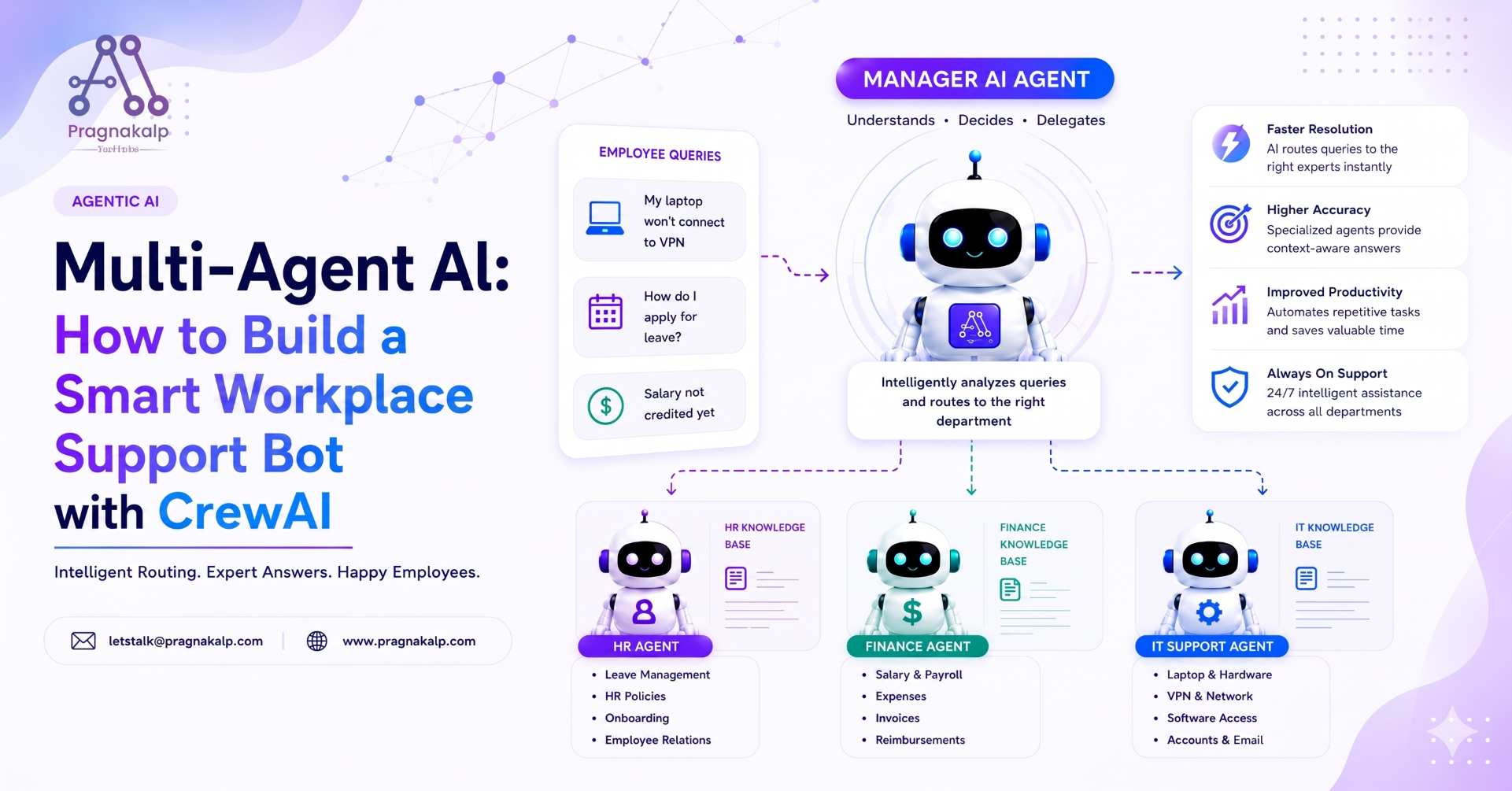
A Multi-Agent System is a setup where multiple specialised AI agents work together, each handling a specific domain.
Think of it like a company:
- You don’t have one “general employee” who does everything
- You have specialists in HR, Finance, and IT, each an expert in their area
- A manager decides who handles each request
In AI, we do the same thing:
					Employee Query
      │
      ▼
┌─────────────────────┐
│   Manager Agent     │  ← reads the query, decides who handles it
│   (Smart Router)    │
└──────────┬──────────┘
           │
  ┌────────┼────────┐
  ▼        ▼        ▼
  HR    Accounts    IT
 Agent   Agent     Agent
The beautiful part? The Manager is an AI, no manual routing code, no if/elif chains. The Manager LLM understands context and delegates intelligently.
Why CrewAI?
We chose CrewAI for this demo because:
- Role-based design: Agents have a role, a goal, a backstory, just like real employees
- Hierarchical process built in: Manager routing works out of the box
- Readable code: A non-technical person can almost read it like English
- Free & open-source: pip install crewai, no license fees
- Production-ready: Used by companies in real systems
The System Architecture
What We're Building
					┌───────────────────────────────────────────────────────┐
│              TECHCORP EMPLOYEE SUPPORT AI             │
│                                                       │
│  Employee: "My laptop won't connect to VPN"           │
│                    │                                  │
│                    ▼                                  │
│         ┌─────────────────────┐                       │
│         │   MANAGER AGENT     │                       │
│         │  (gpt-4o-mini)      │                       │
│         │  "This is an IT     │                       │
│         │   issue → route to  │                       │
│         │   IT Agent"         │                       │
│         └────────┬────────────┘                       │
│                  │ delegates                          │
│                  ▼                                    │
│         ┌─────────────────────┐                       │
│         │    IT AGENT         │                       │
│         │  "Here are the      │                       │
│         │  steps to fix VPN:  │                       │
│         │  1. Check settings  │                       │
│         │  2. Restart client  │                       |
│         │  3. ..."            │                       │
│         └─────────────────────┘                       │
│                  │                                    │
│                  ▼                                    |
|   Final answer returned to employee                   |
└───────────────────────────────────────────────────────┘
Three Specialist Agents
Agent | Department | Handles |
|---|---|---|
HR Agent | Human Resources | Leave, policies, onboarding, WFH |
Accounts | Agent Finance | Salary, expenses, reimbursement, invoices |
IT Agent | IT Support | Laptop, VPN, software, access, accounts |
One Manager Agent
The Manager is not defined as a separate Agent object in CrewAI. Instead, you pass a manager_llm to the Crew. CrewAI creates the manager internally. This manager:
- Reads the employee’s query
- Identifies which department should handle it
- Assigns the task to the correct specialist
- Returns the specialist’s answer as the final response
The Code - Step by Step
Project Structure:
					multi_agent_demo/
├── agents.py    ← HR, Accounts, IT agent definitions
├── tasks.py     ← The employee query task
├── main.py      ← Assemble crew and run
├── .env         ← Your OpenAI API key
└── requirements.txt
Step 1: Install
pip install crewai crewai-tools langchain-openai python-dotenv
Step 2: Set Up API Key
					bash
# .env
OPENAI_API_KEY=sk-your-key-here
Step 3: Define the Agents (agents.py)
					from crewai import Agent

llm = "gpt-4o-mini"
# ── HR Agent ──
hr_agent = Agent(
    role="HR Department Specialist",
    goal=(
        "Answer all Human Resources queries from employees. "
        "Help with leave, policies, onboarding, and hiring questions."
    ),
    backstory=(
        "You are a senior HR specialist at TechCorp with 8 years of experience."
        "Employees get 18 paid leaves, 12 casual, 6 sick per year. "
        "Leave must be applied 2 days in advance. "
        "You are approachable, empathetic, and follow HR protocols."
    ),
    tools=[],
    llm=llm,
    verbose=True,
)
# ── Accounts Agent ──
accounts_agent = Agent(
    role="Accounts & Finance Department Specialist",
    goal=(
        "Handle all finance queries -- salary, expenses, invoices, reimbursements."
    ),
    backstory=(
        "You are a finance specialist at TechCorp. "
        "Salaries are credited on the last working day of every month. "
        "Expense claims must be submitted within 30 days with receipts. "
        "Reimbursement takes 7-10 working days."
    ),
    tools=[],
    llm=llm,
    verbose=True,
)
# ── IT Agent ──
it_agent = Agent(
    role="IT Support Specialist",
    goal=(
        "Resolve all technical issues -- laptop, VPN, software, access."
    ),
    backstory=(
        "You are a level-2 IT support engineer at TechCorp. "
        "You handle hardware, software, email/account access, and VPN. "
        "You escalate urgent issues to the on-site IT team. "
        "You give step-by-step guidance and are patient with non-technical users."
    ),
    tools=[],
    llm=llm,
    verbose=True,
)
Notice something? Each agent has a detailed backstory, this is where you put the company’s policies and knowledge. The agent answers from this context, just like a trained employee would.
Step 4: Define the Task (tasks.py)
In a hierarchical system, we only need one task: the employee’s query. The Manager decides who handles it.
					from crewai import Task
from agents import hr_agent  # default agent (Manager overrides this)

def create_employee_task(employee_query: str, employee_name: str):
    return Task(
        description=(
            f"Employee {employee_name} has submitted this query:\n\n"
            f"'{employee_query}'\n\n"
            "Instructions:\n"
            "1. Understand exactly what the employee is asking\n"
            "2. Provide a complete, accurate response\n"
            "3. List any follow-up steps clearly\n"
            "4. Be professional and empathetic\n"
            "5. End with: 'If you have more questions, feel free to ask!'"
        ),
        expected_output=(
            "A complete, professional response that directly addresses the query, "
            "includes relevant policy details or steps, and is ready to send."
        ),
        agent=hr_agent,  # The Manager will override this automatically
    )
Step 5: Assemble the Crew (main.py)
This is where the magic happens: Process.hierarchical:
					from dotenv import load_dotenv
from crewai import Crew, Process
from agents import hr_agent, accounts_agent, it_agent
from tasks import create_employee_task

load_dotenv()

# Manager uses a smart LLM to route correctly
manager_llm = "gpt-4o-mini"

def run_employee_support(employee_name: str, employee_query: str):

    task = create_employee_task(employee_query, employee_name)

    crew = Crew(
        agents=[hr_agent, accounts_agent, it_agent],
        tasks=[task],
        process=Process.hierarchical,   # ← Manager routes automatically
        manager_llm=manager_llm,
        verbose=True,
    )

    result = crew.kickoff()
    print(result.raw)
    return result.raw
Step 6: Run It!
					if __name__ == "__main__":
    run_employee_support(
        employee_name="Ravi Kumar",
        employee_query="I want to apply for 3 days leave next week. What is the process?"
    )
python main.py
What Happens When You Run It
Query 1: HR Route
					Employee: Ravi Kumar
Query: "I want to apply for 3 days leave next week from Monday to Wednesday."

Manager Agent thinks:
  → "This is about leave application -- HR domain"
  → Delegates to: HR Agent

HR Agent responds:
  "Hi Ravi! Here's how to apply for leave:
   1. Log in to the HRMS portal at hrms.techcorp.com
   2. Go to Leave Management → Apply Leave
   3. Select Leave Type: Paid Leave
   4. Choose dates: Monday to Wednesday (3 days)
   5. Add reason: Family function
   6. Submit for manager approval

   You currently have 8 paid leaves remaining -- more than enough!
   Please apply at least 2 days in advance per company policy.

   If you have more questions, feel free to ask!"
Query 2: Accounts Route
					Employee: Priya Sharma
Query: "My salary for this month has not been credited yet."

Manager Agent thinks:
  → "This is about salary -- Finance/Accounts domain"
  → Delegates to: Accounts Agent

Accounts Agent responds:
  "Hi Priya! I understand your concern about the salary delay.
   At TechCorp, salaries are credited on the last working day of
   every month. If today is before the last working day, your
   salary is still being processed.

   If today is after the last working day:
   1. Check your registered bank account (allow 1-2 hours for bank processing)
   2. Check your payslip on the HRMS portal
   3. Email accounts@techcorp.com with your employee ID

   If you have more questions, feel free to ask!"
Query 3: IT Route
					Employee: Anil Mehta
Query: "My laptop won't connect to VPN. I have a meeting in 2 hours."

Manager Agent thinks:
  → "This is a VPN/technical issue -- IT Support domain"
  → Delegates to: IT Agent (marks as HIGH priority)

IT Agent responds:
  "Hi Anil! Let's fix your VPN issue quickly.

   Step 1: Restart the VPN client (Cisco AnyConnect / GlobalProtect)
   Step 2: Check your internet connection
   Step 3: Clear VPN cache -- go to Settings → Clear Cache
   Step 4: Reinstall VPN client if above doesn't work

   If still not working:
   → Call IT Helpdesk: 1800-XXX-XXXX (24/7)
   → Or email it-urgent@techcorp.com with 'URGENT' in subject

   Given your 2-hour deadline, I recommend calling directly.
   If you have more questions, feel free to ask!"
Key Insight: Why This is Powerful
					# WITHOUT multi-agent: You write manual routing
if "leave" in query or "holiday" in query:
    response = hr_bot.answer(query)
elif "salary" in query or "payroll" in query:
    response = accounts_bot.answer(query)
elif "laptop" in query or "vpn" in query:
    response = it_bot.answer(query)
else:
    response = "Please contact the appropriate department."

# PROBLEM: "I can't access my payslip on the HR portal"
#           → Is this Accounts? Or IT?
#           → Your manual code gets this WRONG


# WITH multi-agent: Manager LLM understands context
crew = Crew(
    agents=[hr_agent, accounts_agent, it_agent],
    process=Process.hierarchical,
    manager_llm=manager_llm,
)
result = crew.kickoff()  # Manager figures it out automatically ✅

# "I can't access my payslip on the HR portal"
# → Manager: "Payslip = Finance content BUT access issue = IT problem"
# → Manager routes to IT Agent ✅
The Manager LLM understands the nuance that keyword matching misses.
Tools - Making Agents More Powerful
Right now, our agents answer from their backstory knowledge. In production, you’d give them real tools:
					from crewai_tools import tool

@tool("Check Leave Balance")
def check_leave_balance(employee_id: str) -> str:
    """
    Check the real-time leave balance for an employee.
    Use when an employee asks about available leaves.
    """
    # Query your HRMS API or database here
    response = requests.get(f"https://hrms.techcorp.com/api/leaves/{employee_id}")
    return response.json()

# Add to HR Agent:
hr_agent = Agent(
    role="HR Department Specialist",
    tools=[check_leave_balance],   # ← Now agent can check REAL data!
    ...
)
Pros and Cons
✅Pros
Benefit | Description |
|---|---|
Smart routing | Manager understands context, not just keywords |
Specialisation | Each agent focuses on one domain = better answers |
Scalable | Add a new department? Just add a new Agent |
No routing code | Remove hundreds of if/elif lines from your codebase |
Handles ambiguity | "Payslip access" → IT, not Accounts -- LLM gets this right |
Easy to update | Change HR policy? Update agent backstory, not code |
❌Cons
Challenge | Description |
|---|---|
Latency | Manager call + specialist call = extra 1-2 seconds |
Cost | 2 LLM calls per query instead of 1 |
Occasional misrouting | Complex queries may go to the wrong agent |
Overkill for simple apps | If you have 1 agent, skip the Manager |
Extending This System
Add More Departments
					legal_agent = Agent(
    role="Legal Department Specialist",
    goal="Handle contract, NDA, compliance, and legal queries.",
    backstory="Expert in company legal policies and employment law...",
    ...
)

admin_agent = Agent(
    role="Admin & Facilities Specialist",
    goal="Handle office access, transport, pantry, and facility requests.",
    ...
)

crew = Crew(
    agents=[hr_agent, accounts_agent, it_agent, legal_agent, admin_agent],
    # Manager automatically handles all 5 departments!
    ...
)
Add Memory (Remember Past Conversations)
					crew = Crew(
    agents=[hr_agent, accounts_agent, it_agent],
    tasks=[task],
    process=Process.hierarchical,
    manager_llm=manager_llm,
    memory=True,   # ← Agents remember previous queries in a session
)
Conclusion
Multi-agent AI systems with a Manager routing pattern are a game-changer for building intelligent support systems.
Instead of writing complex routing logic with hundreds of if/elif conditions, you let the Manager LLM understand context and delegate intelligently, just like a real manager would.
The result: A system that handles any employee query, routes it to the right specialist, and replies with a complete, accurate answer, all without the employee needing to know which department to contact.