Introduction
Organizations receive lead information in different formats, such as business card images and Excel files containing multiple leads. Manually extracting lead details, entering them into a CRM, checking for existing contacts, and contacting each lead can be time-consuming and error-prone.
At the same time, customers and other users often have questions about the company, including its services, products, policies, and general information. They may also want to schedule a discussion or meeting with the company without having to coordinate manually with the team.
To address these requirements, we built an AI-powered automation solution using Hermes Agent, HubSpot, WhatsApp, Google Calendar, company website data, databases, and FAISS-based RAG.
The solution brings three different workflows together:
1. Lead Management Flow – available only to authorized team members for processing business cards and bulk lead files.
2. Company FAQ Flow – available to general users to ask questions about the company and receive answers from trusted company data sources.
3. Meeting Scheduling Flow – available to general users who want to schedule a company discussion or call directly through WhatsApp.
This separation keeps internal lead-management capabilities restricted to authorized team members while allowing public users to access company information and schedule meetings.
System Architecture and Workflow
The complete solution is divided into three workflows:
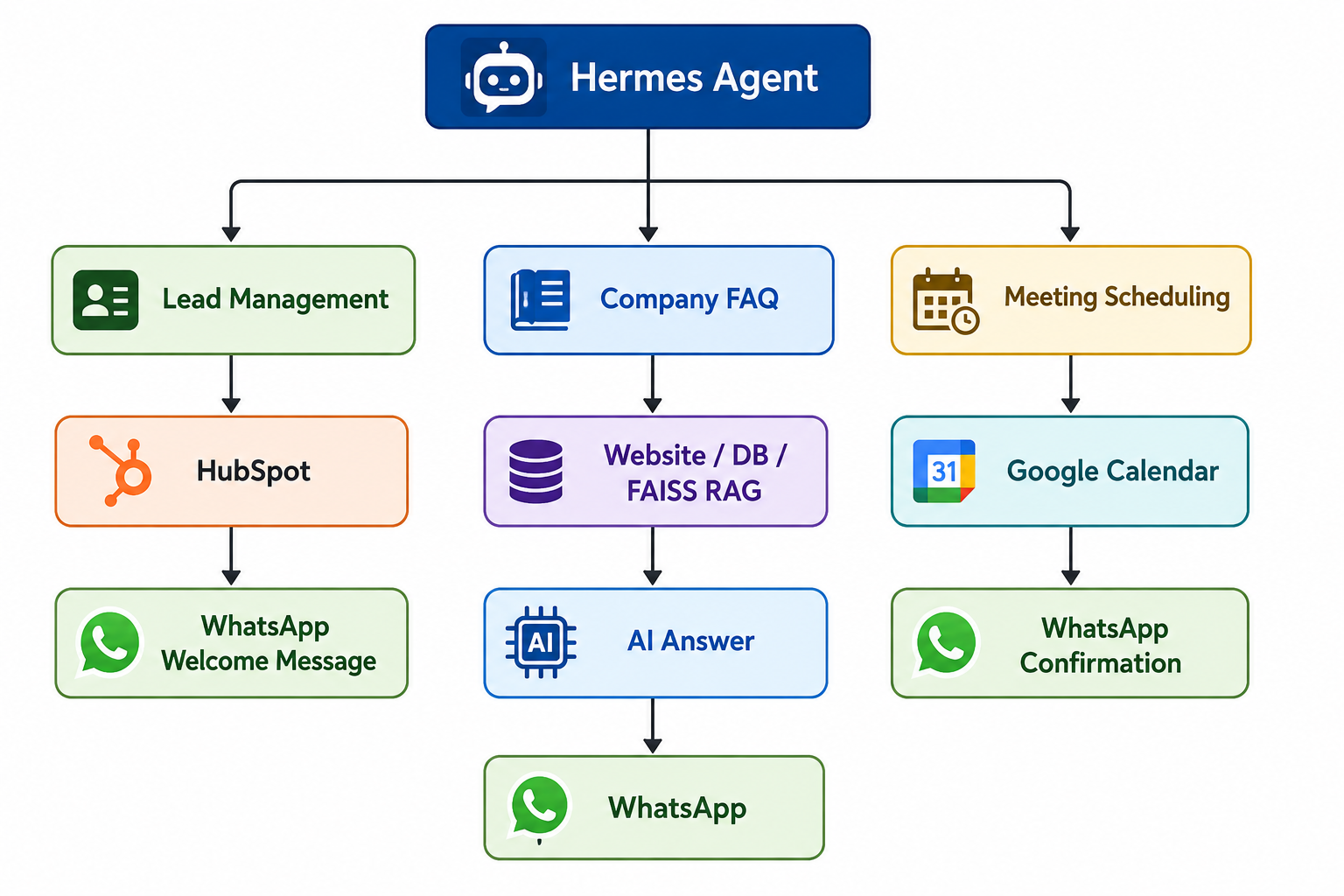
Each workflow has a different purpose and access level.
Flow 1 - Lead Management Automation
The first workflow is designed for authorized internal team members who need to process new leads.
Team members can provide lead information to Hermes through:
- Business card images
- Excel files containing multiple leads
- Other supported lead data
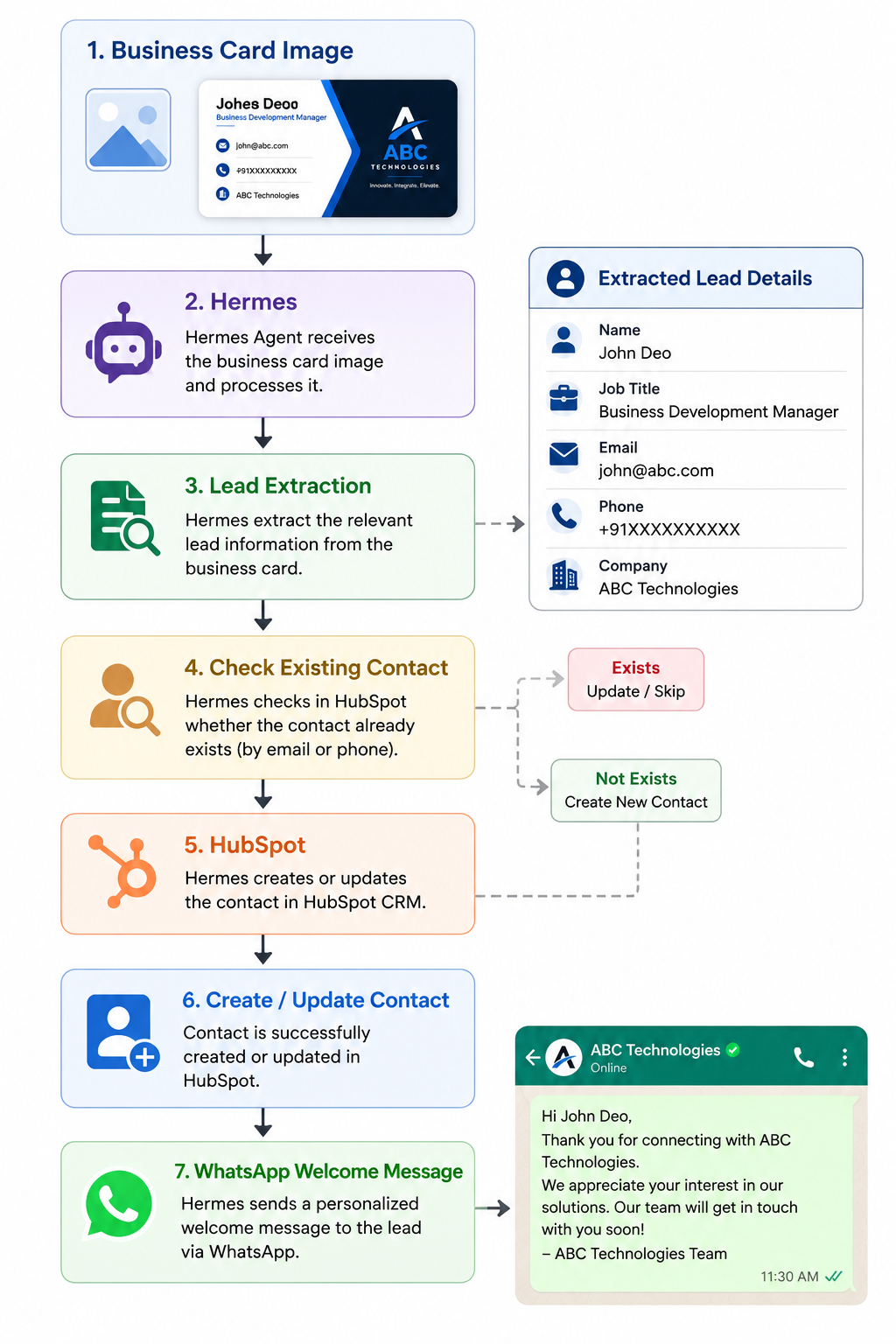
Hermes extracts the lead information, checks whether the contact already exists, processes the lead, and stores the information in HubSpot.
Business Card Processing
A team member can send a business card image to Hermes through WhatsApp.
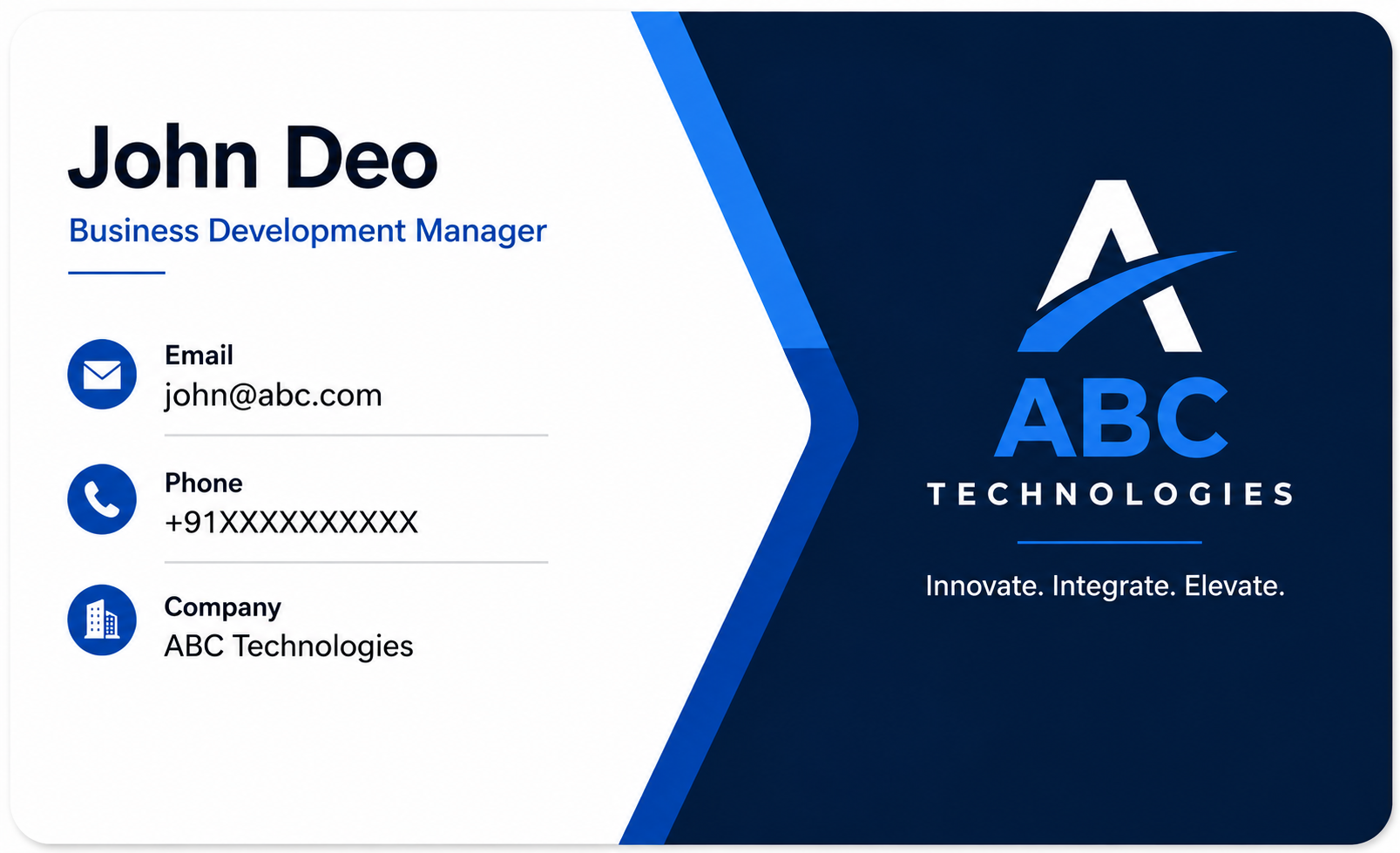
The business card may contain information such as:
- Name
- Phone number
- Company
- Job title
- Other available business details
Instead of manually reading the card and entering the information into the CRM, Hermes extracts the available information and prepares it for CRM processing.
Bulk Lead Processing from Excel
The same workflow can process multiple leads from an Excel file.
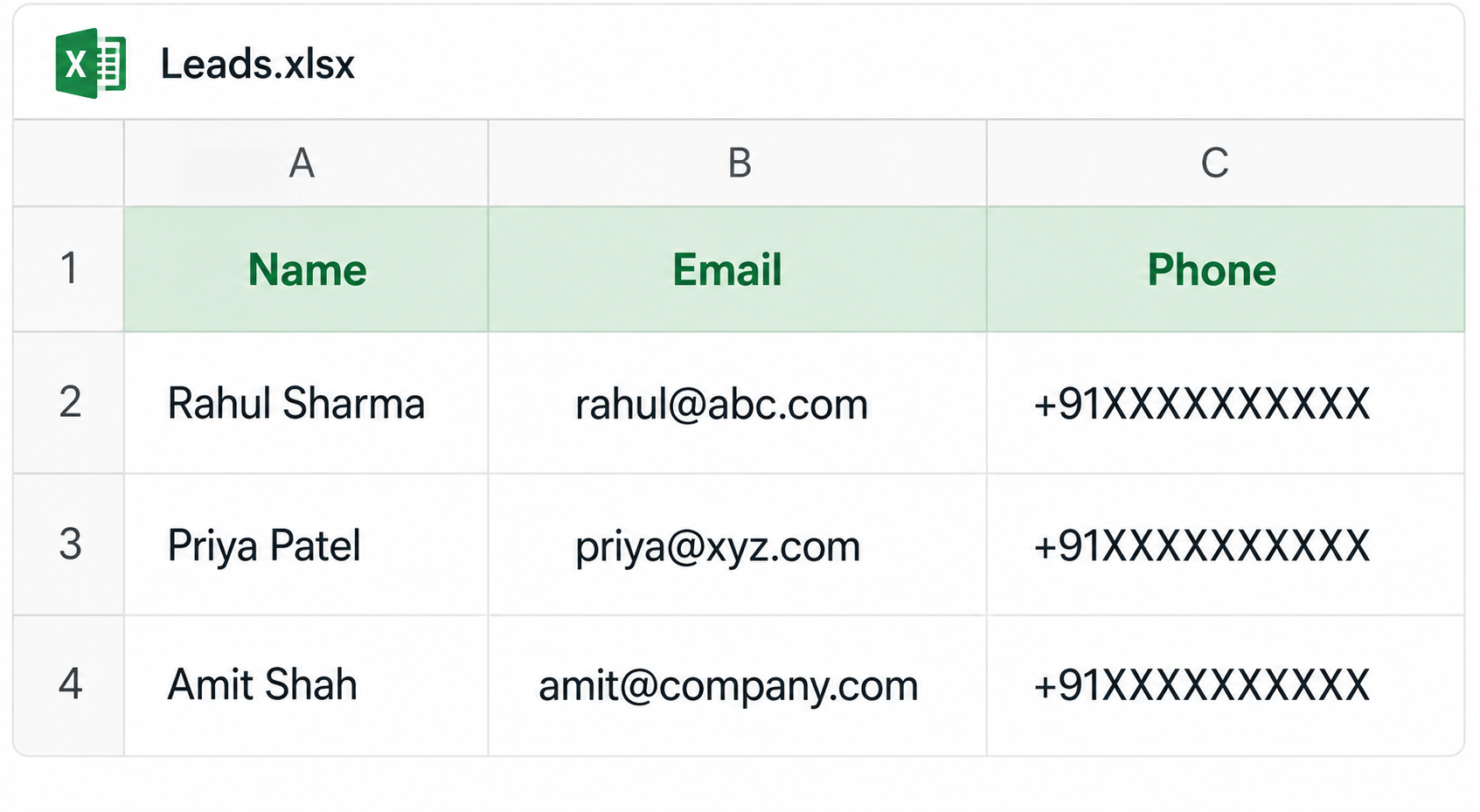
Instead of manually entering each lead into HubSpot, the team member sends the Excel file to Hermes.
This makes the system useful for both individual lead processing and bulk lead processing.
Check Existing Contact
Before creating a new contact, Hermes checks whether the lead already exists in HubSpot.
The contact can be checked using available information such as:
- Phone number
- Email address
This helps prevent duplicate contacts from being created.
This keeps the CRM more organized and avoids unnecessary duplicate records.
HubSpot Contact Management
After extracting and validating the lead information, Hermes connects to HubSpot and creates or updates the contact.
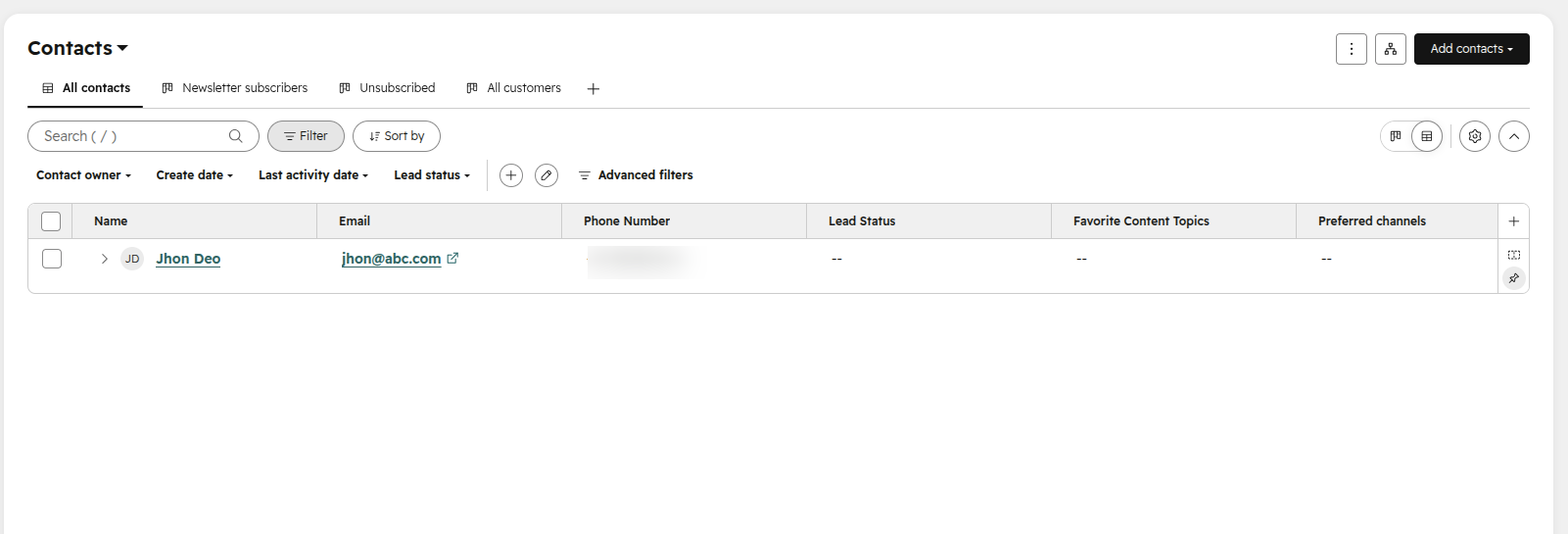
HubSpot becomes the central CRM location for the processed leads.
WhatsApp Welcome Message
After the contact is successfully processed in HubSpot, the workflow can send a welcome message to the lead through WhatsApp.
This allows the company to respond to new leads quickly without requiring the team to manually send each message.
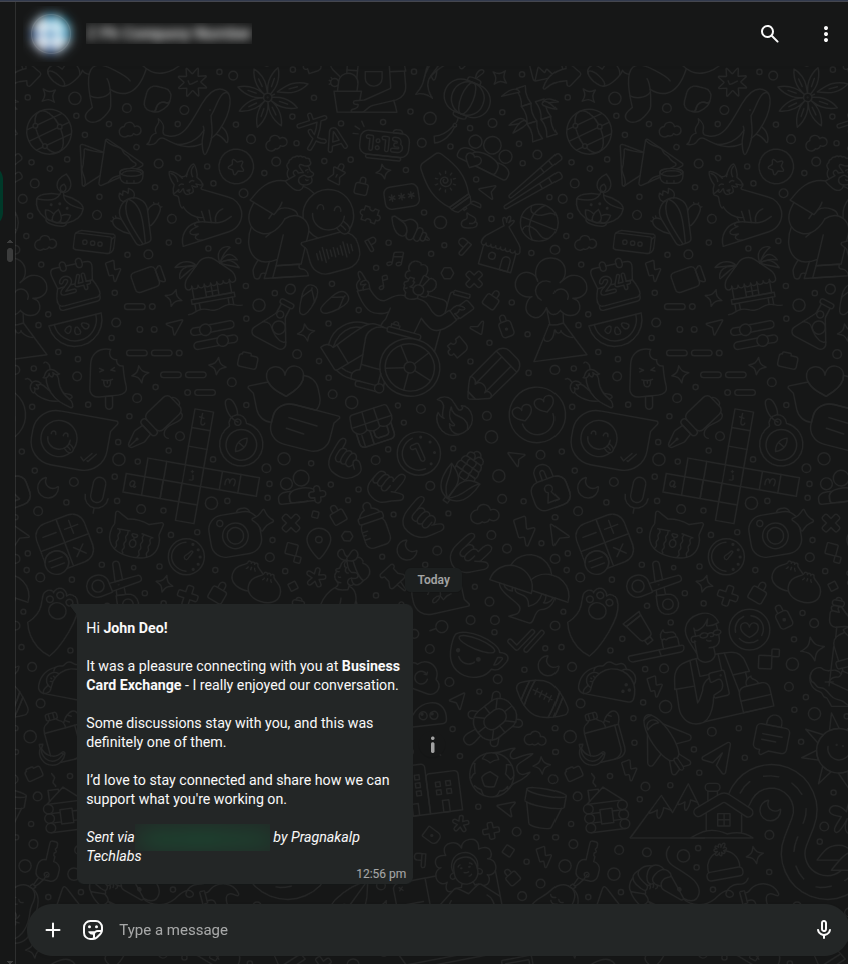
The complete internal workflow is:
Flow 2 - AI-Powered Company FAQ
The second workflow is designed for general WhatsApp users.
Public users do not have access to the internal lead-management workflow. Instead, they can interact with Hermes through WhatsApp and ask questions about the company.
For example:
What services does the company provide?
What products does the company offer?
What are your company policies?
What technologies does your company use?
Hermes receives the question, identifies the appropriate source of information, retrieves the relevant data, and generates a response.
Multiple Knowledge Sources
The FAQ system can use multiple sources of company information.
The main sources are:
1. Company Website
Public company information can be retrieved from the company website.
Examples include:
- Company overview
- Services
- Solutions
- Technologies
- Industries
- Contact information
- Public FAQs
- Company-related information
The website provides publicly available company information that Hermes can use when answering user questions.
2. Company Database
Some structured company information may exist in an internal database.
For example:
- Internal records
- Customer-related information
- Service information
- Operational data
- Structured company information
When a question requires database information, Hermes can retrieve the relevant data and use it to generate the answer.
3. FAISS-Based RAG
Some company information may be stored in documents such as PDFs.
These documents may include:
- Compliance documents
- Technical documentation
- Training material
- FAQs
- Service documentation
These documents are processed using a FAISS-based RAG pipeline.
The FAQ workflow can be summarized as:
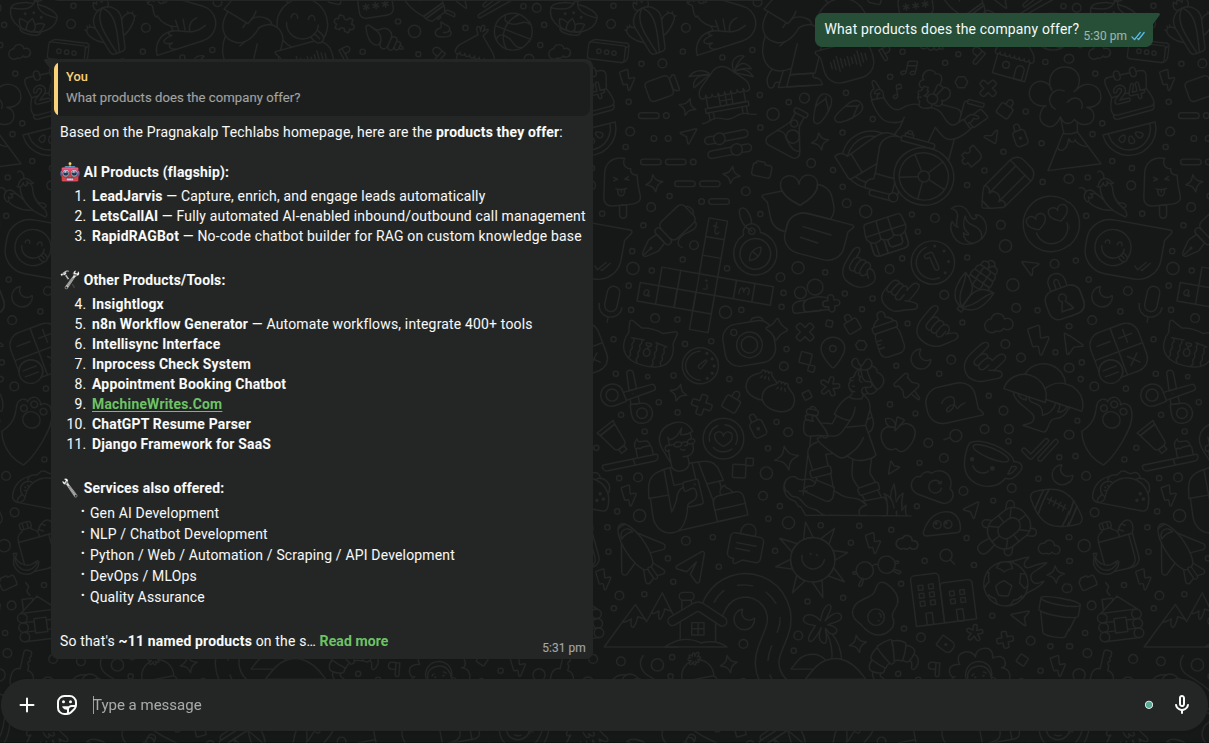
Example FAQ Request
Suppose a user asks:
What products does the company offer?
Hermes receives the question and determines where the required information can be found.
If the information is available on the company website, Hermes retrieves it from the website.
If the information is stored in the database, Hermes retrieves the relevant database information.
If the information exists in company PDFs, Hermes uses the FAISS-based RAG system to find the relevant document content.
Hermes then uses the retrieved information to generate the response and sends it back through WhatsApp.
The user does not need to know which backend source was used. Hermes handles the retrieval and provides the relevant response.
Flow 3 - Meeting Scheduling Through WhatsApp
The third workflow allows public users to schedule a company discussion or call directly through WhatsApp.
Instead of contacting the team separately to find a suitable time, the user can ask Hermes to schedule a meeting.
For example:
I want to schedule a discussion.
Can I book a call tomorrow?
I would like to schedule a meeting about your services.
Hermes identifies the scheduling request and starts the meeting-booking workflow.
1. Collect Meeting Details
Hermes collects the required information from the user.
The required details include:
- Meeting topic or purpose
- Preferred date
- Preferred time
- Attendee name
- Attendee email
- Meeting duration
Hermes asks for only the missing information one at a time instead of asking the user to complete a long form.
2. Check Current Time
Hermes uses the Google Calendar integration to get the current time and uses it as the scheduling reference.
This helps Hermes correctly understand natural-language requests such as:
Tomorrow at 3 PM
Today at 5 PM
Monday morning
This allows the scheduling workflow to interpret the user’s requested date and time correctly.
3. Check Calendar Availability
After receiving the requested date and time, Hermes checks Google Calendar availability through the calendar MCP server.
If the requested time is available, Hermes can continue with the booking.
If the requested time is unavailable, Hermes can provide available options so the user can select another slot.
4. Create the Meeting
Once the user confirms an available slot, Hermes creates the meeting in Google Calendar.
The event contains relevant meeting information, such as:
- Meeting topic
- Start time
- End time
- Attendee email
- Meeting notes when supported
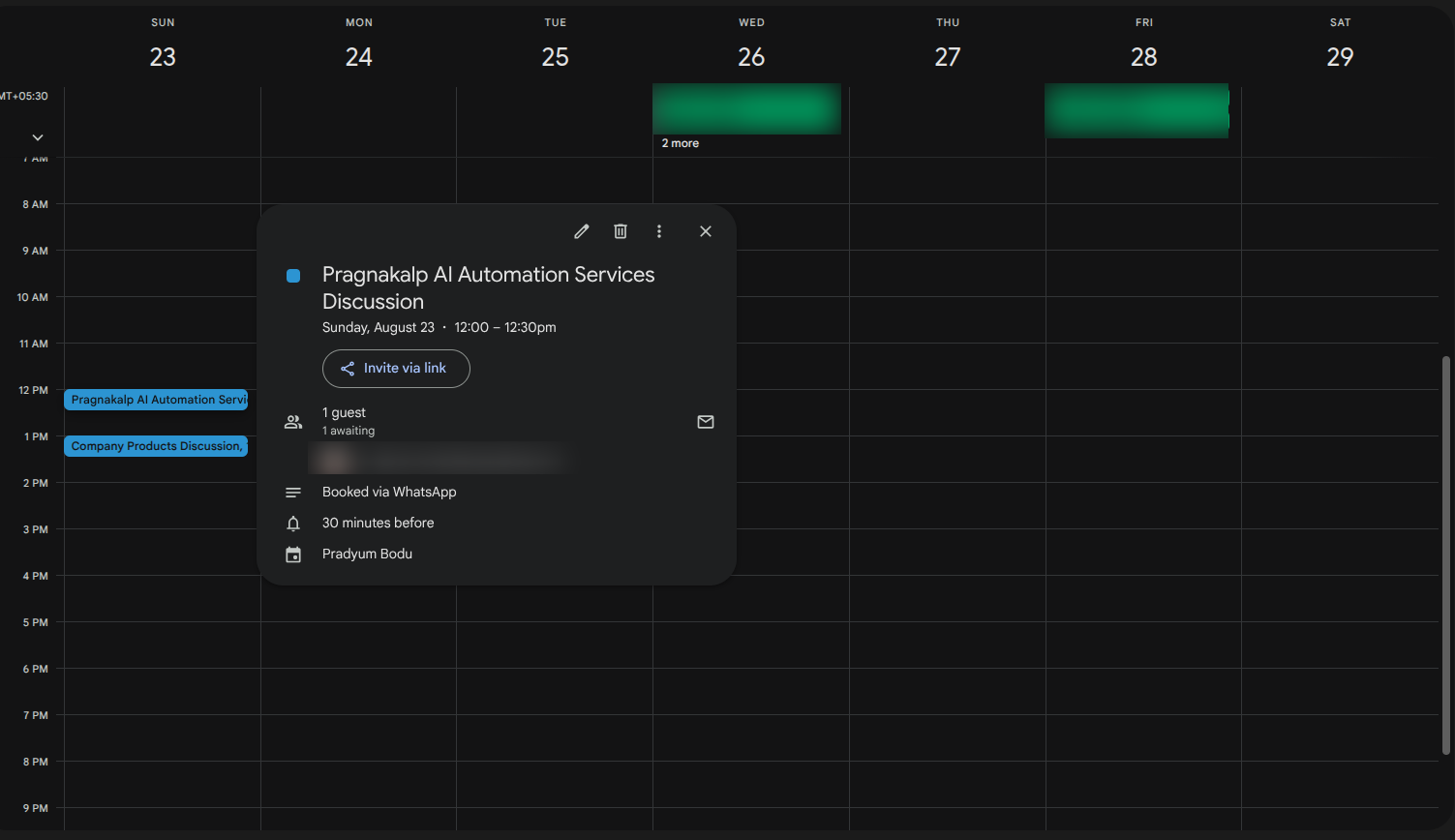
5. Meeting Confirmation
After successfully creating the event, Hermes sends a confirmation through WhatsApp.
The confirmation includes information such as:
- Meeting date
- Meeting time
- Meeting details
- Available meeting or location information
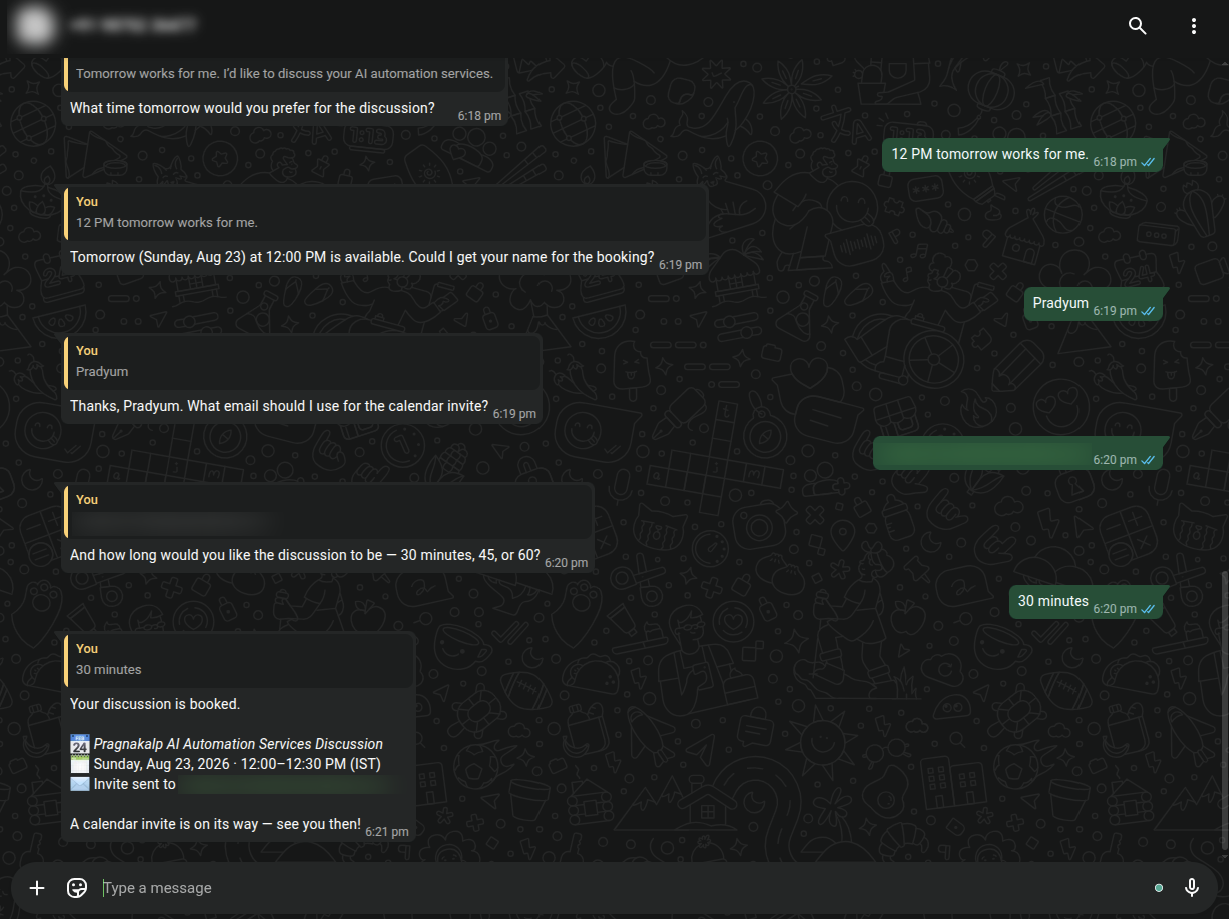
The complete meeting workflow is:
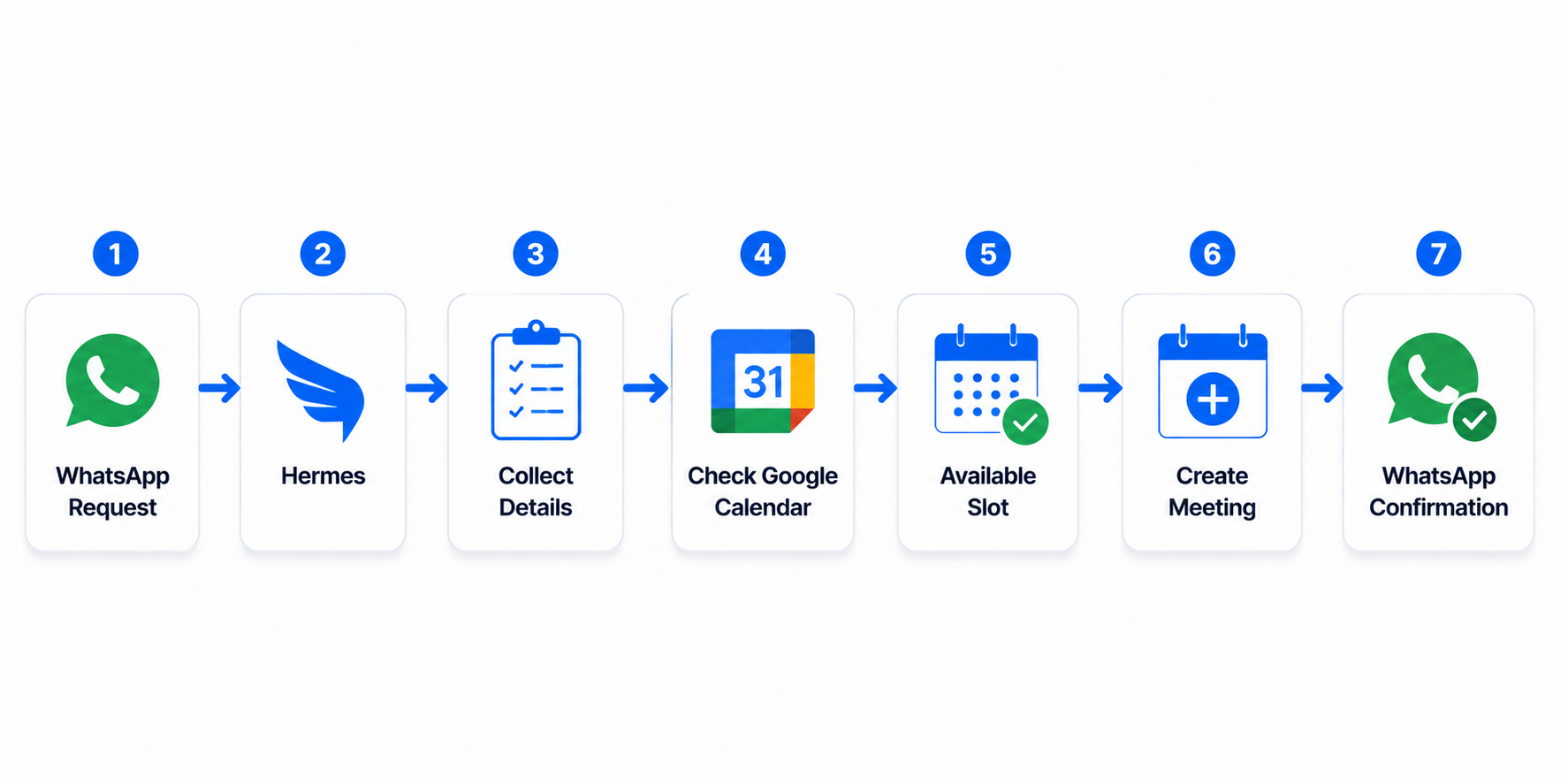
This allows users to schedule company discussions without requiring manual coordination from the team.
Access Control Between the Three Flows
An important part of this solution is that different users have access to different workflows.
The system separates internal CRM operations from public-facing services.
Authorized Team Members
Authorized team members can access the Lead Management Flow.
Business Card / Excel
↓
Hermes
↓
Lead Extraction
↓
Check Existing Contact
↓
HubSpot
↓
WhatsApp Welcome Message
This workflow is restricted to authorized team members.
General Users
General users can access the Company FAQ and Meeting Scheduling workflows.
Company FAQ
WhatsApp
↓
Hermes
↓
Company FAQ
↓
Website / Database / FAISS
↓
Answer
↓
WhatsApp
Meeting Scheduling
WhatsApp
↓
Hermes
↓
Meeting Details
↓
Google Calendar
↓
Availability Check
↓
Create Meeting
↓
WhatsApp Confirmation
Public users cannot access the internal lead-processing functionality or HubSpot lead-management workflow.
This role-based separation helps protect internal CRM operations while still providing useful services to external users.
AI-Powered Automation
AI plays an important role across all three workflows.
Lead Management
AI helps with:
- Extracting information from business card images
- Reading Excel data
- Structuring lead information
- Processing multiple leads
- Identifying relevant contact fields
- Checking information required for CRM processing
- Preparing information for HubSpot
Company FAQ
AI helps with:
- Understanding natural-language questions
- Selecting the appropriate knowledge source
- Retrieving relevant information
- Understanding retrieved document content
- Generating natural-language responses
Meeting Scheduling
AI helps with:
- Understanding scheduling requests
- Collecting meeting details
- Interpreting natural-language dates and times
- Checking available calendar slots
- Creating calendar events
- Providing meeting confirmations
This allows users and team members to interact with the system naturally through WhatsApp without needing to understand the underlying integrations.
Business Benefits
The combined solution provides several advantages:
- Automated lead extraction from business cards
- Bulk lead processing from Excel files
- Reduced manual CRM data entry
- Duplicate contact checking
- HubSpot contact automation
- Faster lead follow-up
- Automated WhatsApp welcome messages
- Centralized company knowledge access
- AI-powered FAQ responses
- Retrieval from company website data
- Retrieval from internal databases
- Retrieval from company PDFs using FAISS-based RAG
- WhatsApp-based meeting scheduling
- Natural-language date and time handling
- Real-time calendar availability checking
- Automated meeting creation
- Meeting confirmation through WhatsApp
- Role-based access control
- Separate internal and public workflows
- Reduced repetitive support and coordination tasks
- Scalable AI-powered business automation
Conclusion
Our AI-Powered Lead Management, Company FAQ, and Meeting Scheduling Automation solution combines Hermes Agent, HubSpot, WhatsApp, Google Calendar, company website data, databases, and FAISS-based RAG into a single intelligent workflow.
For internal team members, the system simplifies lead processing. A team member can send a business card image or Excel file, Hermes extracts the lead information, checks whether the contact already exists, and stores the lead in HubSpot. After the lead is successfully processed, a WhatsApp welcome message can be sent automatically.
For general users, the system provides two services through WhatsApp. Users can ask questions and receive information retrieved from the company’s website, database, or PDF knowledge base. They can also schedule a company discussion or call by providing their meeting details and selecting an available calendar slot.
The complete solution can be summarized as:
TEAM — Lead Management
Business Card / Excel → Hermes → Lead Extraction → Check Existing Contact → HubSpot → WhatsApp Welcome Message
PUBLIC — Company FAQ
WhatsApp Question → Hermes → Website / Database / FAISS RAG → Relevant Information → AI Answer → WhatsApp
PUBLIC — Meeting Scheduling
WhatsApp Request → Hermes → Meeting Details → Google Calendar → Availability Check → Create Meeting → WhatsApp Confirmation
By separating these workflows based on user roles, the system provides internal teams with secure lead automation while giving public users a simple way to access company information and schedule discussions directly through WhatsApp.