The Problem
Anyone who has tried to find a home over WhatsApp knows the drill: you send a vague message, the agent asks a bunch of follow-up questions, and somewhere in between you’re both juggling links from five different property websites. It’s slow, repetitive, and hard to keep organized.
Specifically, users searching for properties through WhatsApp often send incomplete and unstructured requests – key details like budget, BHK, locality, furnishing, or property type are frequently missing. This creates a handful of recurring headaches:
- Repeated back-and-forth clarification between the user and the property agent
- Manual searching across multiple property-listing websites
- Difficulty comparing listings pulled from different sources
- Manually creating Google Maps links for every address
- Large volumes of unstructured search results to sift through
- Slower response times when handling multiple inquiries at once
The goal was to build an AI assistant that could understand natural-language property requests, ask for missing information only when needed, search live listings, filter down to what actually matters, and return everything in a clean, WhatsApp-friendly format.
Our Solution
We built a custom Hermes Agent skill that turns free-text WhatsApp property requests into structured, filtered results – without relying on any proprietary property database.
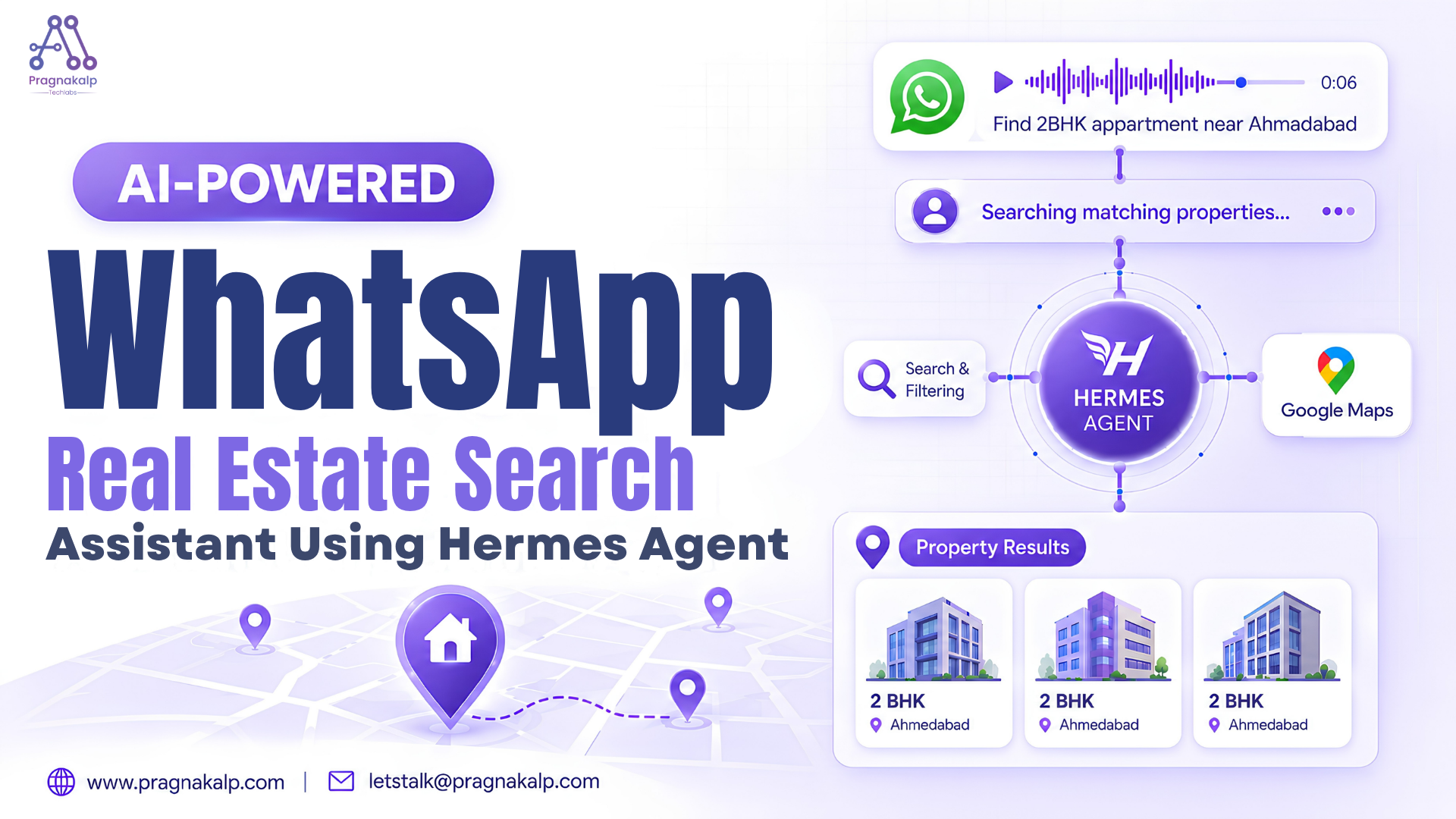
Instead, the assistant performs live web searches across property-listing sources and processes the results based on what the user actually asked for. End to end, it:
1. Understands the user’s natural-language property request
2. Extracts the important search parameters
3. Asks targeted clarification questions only when necessary
4. Validates the requested locality
5. Searches multiple property-listing sources
6. Extracts and normalizes relevant listing information
7. Applies the user’s filters
8. Generates Google Maps links for each result
9. Returns 3–5 concise property results formatted for WhatsApp
The skill follows a modular architecture, with conversation rules, source selection, Maps generation, and WhatsApp formatting each maintained in separate reference files – more on that below.
Here is the demo video of AI Text and Voice Based assistant for Real Estate Property search on WhatsApp
Turning Free Text into Structured Requirements
The first job of the assistant is converting an unstructured message into structured search parameters.
User request:
“I need a 2 BHK flat for rent in Vesu under 25k, preferably semi-furnished.”
Extracted requirements:
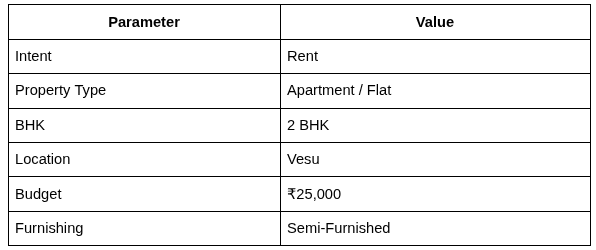
That structured table is what actually drives the property search – not the raw sentence.
Validating the Locality
Getting the location right matters more than almost anything else in a property search. If the assistant searches the wrong area, every result downstream is useless.
So instead of guessing, the assistant validates ambiguous or incomplete locality information before it runs a search. If a location looks unclear or misspelled, it asks rather than assumes – which avoids irrelevant recommendations built on a bad guess.
Where the Listings Come From
The assistant doesn’t maintain its own property database. Property information is sourced dynamically from publicly available property-listing websites, and the workflow extracts details such as:
- Property type
- BHK
- Location
- Price / Rent
- Furnishing
- Area
- Address
- Listing URL
Because every website formats this information differently, everything gets normalized into a consistent structure before it’s shown to the user.
Searching Across Multiple Sources
A single listing source rarely has enough good matches on its own, so the assistant searches across multiple sources and falls back to others when needed. The process breaks down into a few stages:
1. Source Selection – pick the appropriate configured property sources based on the user’s requirements
2. Listing Discovery – retrieve relevant listings from the available sources
3. Information Extraction – pull the important details out of each listing
4. Result Normalization – standardize information from different sources into one consistent format
5. Result Selection – choose the most relevant listings for the final response
Filtering and Matching
Once listings are collected, the assistant filters them against what the user actually asked for – buy vs. rent, location, property type, BHK, budget, furnishing, and any other stated preferences.
For a requirement like 2 BHK + Rent + Vesu + ₹25K + Semi-Furnished, the assistant evaluates all available listings against those criteria and keeps only the best matches. The final response is deliberately capped at a small number of listings so results stay easy to scan – no walls of text.
Automatic Google Maps Links
Listings usually come with an address, but users still have to manually search for the location themselves – a small but annoying extra step. The assistant automates this by generating a Google Maps link directly from each listing’s address.
So every selected property comes with three things attached:
- Property address
- Listing URL
- Google Maps URL
That means a user can go straight from a result to the actual location without lifting a finger.
Hermes Skill Architecture
Rather than cramming everything into one giant prompt, the real-estate assistant is built as a modular Hermes skill:
real-estate-whatsapp/
├── SKILL.md
└── references/
├── conversation_flow.md
├── sources.md
├── maps_linking.md
└── wa_message_templates.md
- SKILL.md – controls the overall workflow and agent behavior
- conversation_flow.md – defines the conversation and clarification logic
- sources.md – defines property-search sources and source-selection behavior
- maps_linking.md – defines the process for generating Google Maps links
- wa_message_templates.md – defines the structure and formatting of WhatsApp responses
Splitting things up this way makes the skill much easier to maintain, update, and audit over time.
Example: End-to-End Search
User request:
“Looking for a 2 BHK flat for rent in Vesu under 25k. Semi-furnished preferred.”
Extracted requirements:
- Intent: Rent
- Property Type: Flat / Apartment
- BHK: 2 BHK
- Location: Vesu
- Budget: ₹25,000
- Furnishing: Semi-Furnished
Search & filtering: Hermes searches the configured property-listing sources and evaluates the available listings against the extracted requirements, prioritizing matches on location, property type, BHK, budget, and furnishing.
Final response: Hermes returns 3–5 relevant listings, each with property details, price, location, a listing link, and a Google Maps link – ready for the user to pick one and keep the conversation going.
Challenges & Solutions
Unstructured user input Challenge: Users don’t follow a fixed property-search format. Solution: Natural-language requirement extraction converts free-text messages into structured parameters.
Missing information Challenge: Users frequently omit important search criteria. Solution: Targeted clarification questions are asked only when genuinely required.
Ambiguous locations Challenge: A locality may be incomplete, misspelled, or ambiguous. Solution: The assistant validates the location before searching instead of guessing.
Different listing formats Challenge: Property websites present information in different structures. Solution: Listing information is extracted and normalized before filtering and formatting.
Too many results Challenge: Live searches can return large numbers of listings. Solution: Results are filtered against user requirements and capped at 3–5 listings.
Mobile messaging format Challenge: Raw search results are hard to read on WhatsApp. Solution: Listings are converted into structured, concise WhatsApp message blocks.
Conclusion
The WhatsApp Real-Estate Search Assistant shows how a Hermes Agent can turn an unstructured conversational request into a complete property-search workflow – from natural-language understanding and smart clarification, to locality validation, live multi-source search, filtering, Google Maps integration, and WhatsApp-specific formatting.
The result is less repetitive manual work for agents and concise, actionable results for users. More broadly, this project is a good example of how modular Hermes skills can be built for real-world business workflows, where agent instructions, reference files, search rules, and response templates all work together to create reusable AI-powered assistants.